The system for detecting anomalies in the behavior of employees based on Physical Access Control Systems data
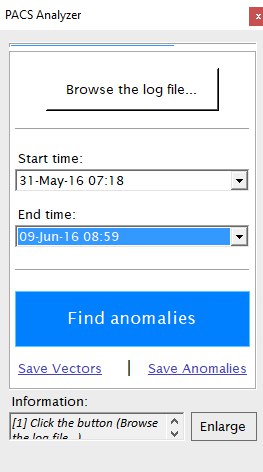
PACS Analyzer
│   Anomalies.sql           <-- SQL commands to find anomalies from [GraphByDate] table
│   DatabaseMain.mdf        <-- DataBase file containing all the tables
│   Example.csv             <-- Example PACS log file (contains a few users and few weeks of observation
│   FileHelpers.dll         <-- Third-party library for parsing CVS files
│   GraphByDateFillIn.sql   <-- SQL commands to fill in [GraphByDate] table from [Intervals] table
│   PACS Analyzer.exe       <-- Main executable file. The Program.
│
└───anomalies                     <-- Folder appears after Anomalies were found
│   │   anomalies.txt             <-- Contains a table of odd behavior of employees
└───users                         <-- Folder appears after Vectors were saved
    │   1_user_Dedos_Lidelse.txt  <-- Contains a list of employee`s meetings
    │   2_user_Onda_Marin.txt
    │   ...
You run the program and select the log file to search for anomalies.
openFileDialogChooseFile.Filter = "CSV files|*.csv";

...

var engine = new FileHelperEngine<CSVReader>();
CSVReader[] result = new CSVReader[0];
try
{
  result = engine.ReadFile(_formCoreGlobalObject.filePath);// read the file
}
catch (Exception e)
{
  MessageBox.Show("Cannot find the file:\n" + _formCoreGlobalObject.filePath + "\n\n" + e.Message, "Warning", MessageBoxButtons.OK, MessageBoxIcon.Warning);
  return false;
}
You can configure the desired time period and run the main algorithm.
backgroundWorkerTable.RunWorkerAsync(_formCoreGlobalObject);First, it fills in the [Intervals] table
SqlCommand emptyUsers = new SqlCommand("TRUNCATE TABLE [intervals];", sqlConnection);

...

// List of lines with User(client) filter
var timeGapList = from line in result
                  where line.timestamp >= _formCoreGlobalObject.timeFrom && line.timestamp <= _formCoreGlobalObject.timeTill
                  orderby line.timestamp
                  select line;

...

foreach (var line in timeGapList)
{
  ThreadPool.QueueUserWorkItem(new WaitCallback(fillInIntervals), new object[] { line, timeGapList });
}

...

_waitThreads.WaitOne();// Wait until the task is completeSecond, it runs GraphByDateFillIn.sql
Absolutely the same happens next with Anomalies.sql
Profit!
Now all the data stores in [AnomaliesTEMP] table for Anomalies and in [Intervals] for Vectors.
To save Vectors click relevant button.
_stopWatch.Start();// start time
this.Cursor = Cursors.WaitCursor;// Set wait cursor
foreach (KeyValuePair<User, int> userPair in _formCoreGlobalObject.userList)// add all users to ThreadPool to save files
  {
    ThreadPool.QueueUserWorkItem(new WaitCallback(saveToFileByUser), userPair.Key);
  }
_stopWatch.Stop();// stop time
 richTextBoxInfo.Text = _vectorsSavedMessage + " " + _stopWatch.Elapsed.Milliseconds + _secondsLabel;
this.Cursor = Cursors.Default;// UNset wait cursor
To save Anomalies click relevant button.
using (SqlCommand readAnomalies = new SqlCommand("SELECT * FROM [AnomaliesTEMP];", sqlConnection))// First, read whole table [AnomaliesTEMP]
{
info = new UTF8Encoding(true).GetBytes(
                                    line["date"]
                                    + ";"
                                    + _formCoreGlobalObject.userList.FirstOrDefault(x => x.Value == Convert.ToInt32(line["user_source_id"])).Key.empID
                                    + ";"
                                    + _formCoreGlobalObject.userList.FirstOrDefault(x => x.Value == Convert.ToInt32(line["user_target_id"])).Key.empID
                                    + ";"
                                    + odd_duration.ToString()
                                    + ";"
                                    + "0"
                                    + ";"
                                    + line["times"]
                                    + ";"
                                    + line["times_AVG"]
                                    + ";"
                                    + line["floor"]
                                    + ";"
                                    + line["zone"]
                                    + "\n");

fs.Write(info, 0, info.Length);
}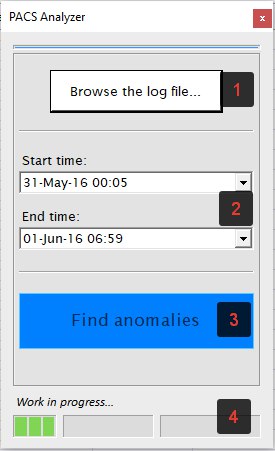
- [1] Click the button (Browse the log file...)
- Pick the file Example.csv from the folder with a project
- [2] Choose time gap with two drop-down date lists
- [3] Click (Find anomalies) to start the main algorithm
- [4] You may watch the progress below (it may take time to analyze big files)
- Two buttons to save Anomalies and Vectors