Developing dev 5
Multiple instances running on dev-5.pc
Listed HERE.
When creating new deployment, deploy.yml in angular repo must be modified.
name: Deploy DSpace

on:
  workflow_dispatch:

jobs:
  deploy:
    runs-on: dspace-dep-1
    steps:
      - uses: actions/checkout@v3
        with:
          submodules: false
      - name: deploy
        run: |
          cd $GITHUB_WORKSPACE/build-scripts/run/
          pwd

          touch .env.dev-5 || true
          echo DSPACE_REST_HOST=dev-5.pc > .env.dev-5
          echo REST_URL=http://dev-5.pc:808xxx/server >> .env.dev-5
          echo UI_URL=http://dev-5.pc:8xxx >> .env.dev-5
          echo DSPACE_REST_IMAGE=dataquest/dspace:dspace-7_x >> .env.dev-5
          echo DOCKER_OWNER=dataquest >> .env.dev-5
          ## echo NODE_ENV="development" >> .env.dev-5
          echo DSPACE_UI_IMAGE="dataquest/dspace-angular:dspace-7_x" >> .env.dev-5
          echo INSTANCE=xxx >> .env.dev-5
          echo DSPACE_VER="dspace-7_x" >> .env.dev-5

          export ENVFILE=$(pwd)/.env.dev-5
          ./start.sh dspace-xxx
All bold xxx must be replaced by one number (REST_URL, UI_URL, INSTANCE, ./start.sh dspace-XXX). Tested only with the same number, so for example 2.
Then nginx on dev-5.pc must be modified. Currently just ports 82, 85, 86 are prepared. In default config (/etc/nginx/sites-enabled/default)
Also erase_db.yml action must be modified, namely INSTANCE in the beginning and branch ref in the request to issue redeploy at the end.
name: Erase database

on:
  workflow_dispatch:

jobs:
  restart_db:
    env:
      INSTANCE: 2
    runs-on: dspace-dep-1
    steps:
      - uses: actions/checkout@v3
        with:
          submodules: false
      - name: stop and remove containers
        run: |
          docker stop dspacedb$INSTANCE dspace$INSTANCE dspace-angular$INSTANCE
          docker rm dspacedb$INSTANCE dspace$INSTANCE dspace-angular$INSTANCE
      - name: remove volumes
        if: '!cancelled()'
        run: |
          docker volume rm dspace-${{env.INSTANCE}}_pgdata dspace-${{env.INSTANCE}}_assetstore

      - name: redeploy
        if: '!cancelled()'
        run: |
          curl -H "Accept: application/vnd.github.everest-preview+json" \
          -H "Authorization: token ${{ secrets.DEPLOY_DEV5_GH_ACTION_DISPATCH }}" \
          --request POST \
          https://api.github.com/repos/dataquest-dev/\
          dspace-angular/actions/workflows/deploy.yml/dispatches \
          --data "{\"ref\":\"refs/name-of-the-branch-e-g-dtq-dev\"}"
Docker images action, currently in file docker.yml must be updated. Branch should be modified accordingly, both in frontend and backend, just like in previous file
- name: redeploy
        if: '!cancelled()'
        run: |
          curl -H "Accept: application/vnd.github.everest-preview+json" \
          -H "Authorization: token ${{ secrets.DEPLOY_DEV5_GH_ACTION_DISPATCH }}" \
          --request POST \
          https://api.github.com/repos/dataquest-dev/\
          dspace-angular/actions/workflows/deploy.yml/dispatches \
          --data "{\"ref\":\"refs/your-branch-name\"}"
If you want to import data to dev-5, first you need erased database. Go to dspace-angular repo, click Actions, select Erase Database and dispatch the run.

Note, this assumes running dspace on dev-5. If it is not running, first dispatch deploy dspace Also note that things take time. 2 or 3 minutes should suffice in each case...
Then you can import from python api. Since we want to import sensitive data, that cannot be uploaded
anywhere, data import must run locally. Download dspace python api project, set data_import_location
in const.py and run in Docker like usual.
sudo docker exec -it <CONTAINER_NAME> bash
psql -U dspace -p 543
docker exec -it --user postgres <CONTAINER_ID> bash
docker exec -it <CONTAINER_ID> createdb --username=dspace --owner=dspace --encoding=UNICODE dspace
docker exec -it 72849f84e051 psql --username=dspace dspace -c "CREATE EXTENSION pgcrypto;"
docker exec -it <CONTAINER_ID> psql -U dspace -d postgres -c "DROP DATABASE dspace;
docker exec -it <CONTAINER_ID> psql -U dspace -d dspace bash
docker exec -it <CONTAINER_ID> psql -U dspace -d dspace -c "SELECT * FROM handle" -p
docker exec -it <CONTAINER_ID> psql -U dspace -d dspace -c "ALTER SEQUENCE <SEQUENCE_NAME> RESTART WITH 1;" docker exec -it <CONTAINER_ID> psql -U dspace -d dspace -c "UPDATE <TABLE_NAME> SET <ID_COLUMN>=nextval('<SEQUENCE_NAME>');"
sudo docker exec dspacedb8 pg_dump -U dspace -p 5438 -d dspace > dspace_dump_9.2._imported.sql
sudo docker exec -i dspacedb6 sh -c 'psql -U dspace -p 5436 -d dspace' < dump.sql
It is possible to allow debug connection to dev-5. It is necessary to issue command
sudo docker exec -d dspace /usr/local/tomcat/bin/redebug.sh
on dev-5 ssh command line.
Then it is possible to connect with following configuration:
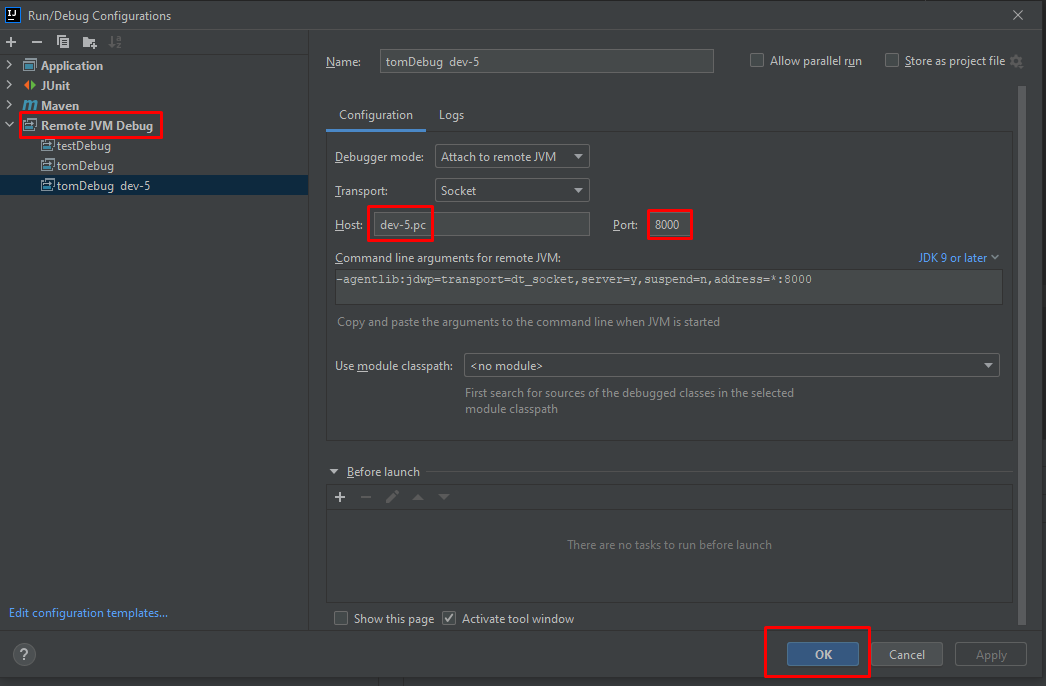 After finishing debugging, issue command
sudo docker exec -d dspace /usr/local/tomcat/bin/undebug.sh
to forbid debugging connections.
Note: Please wait between issuing commands for redebug and undebug at least for a minute or ensure through docker logs dspace that server is running, before issuing the commands.
/opt/dockerized-nginx-with-shibboleth/nginx/conf/templates/default.conf.template
 location /server/ {
        include proxy_params;
        client_max_body_size ${NGINX_MAX_BODY_SIZE};

        ## Timeout ##
        proxy_connect_timeout 6000;
        proxy_send_timeout 6000;
        proxy_read_timeout 6000;
        send_timeout 6000;

        proxy_pass http://tomcat;
    }
sudo docker restart dockerized-nginx-with-shibboleth-nginx-1
/etc/nginx/nginx.conf