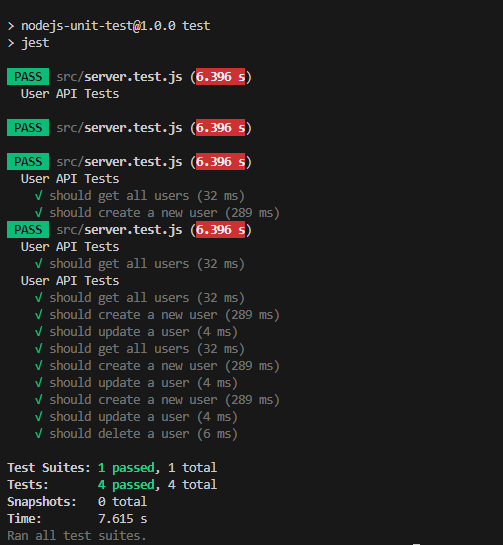
This project demonstrates how to perform unit testing on an Express.js API using Jest and Supertest.
Unit testing is a software testing method where individual components of a program (functions, modules, or classes) are tested independently to ensure they work correctly. The main goals of unit testing are:
- Detecting bugs at an early stage.
- Ensuring that each function behaves as expected.
- Making the code more maintainable and reliable.
- Jest - A JavaScript testing framework for writing and running tests.
- Supertest - A library for testing HTTP endpoints.
First, clone the repository and install dependencies.
git clone https://github.com/FRTYZ/nodejs-unit-test.git
cd nodejs-unit-testnpm install
node src/server.jsThe server runs on http://localhost:8000 (default port).
This project uses Jest and Supertest for testing.
npm test
const express = require('express');
const app = express();

app.use(express.json());

let users = [{ id: 1, name: 'Firat' }];

app.get('/users', (req, res) => {
    res.json(users)
})

app.post('/users', (req,res) => {
    const newUser = {id: users.length + 1, name: req.body.name};

    users.push(newUser);

    res.status(201).json(newUser)
});

app.put('/users/:id', (req, res) => {
    const user = users.find((item) => item.id === parseInt(req.params.id));

    if(!user) return res.status(404).json({message: 'not found'})

    user.name = req.body.name;

    res.json(user)
})

app.delete('/users/:id', (req,res) => {
    users = users.find(item => item.id !== parseInt(req.params.id));

    res.status(204).send()
})

module.exports = app;
const request = require('supertest');
const app = require('./server');

describe('User API Tests', () => {

    it('should get all users', async() => {
        const res = await request(app).get('/users');

        expect(res.statusCode).toBe(200);
        expect(res.body).toEqual([{ id: 1, name: 'Firat' }])
    });

    it('should create a new user', async() => {

        const res = await request(app)
            .post('/users')
            .send({name: 'Mehmet'});

        expect(res.statusCode).toBe(201);
        expect(res.body).toHaveProperty('id');
        expect(res.body.name).toBe('Mehmet')
    })

    it('should update a user', async () => {
        const res = await request(app)
            .put('/users/1')
            .send({name: 'Veli'})

        expect(res.statusCode).toBe(200);
        expect(res.body.name).toBe('Veli')
    })

    it('should delete a user', async () => {
        const res = await request(app)
            .delete('/users/1')

        expect(res.statusCode).toBe(204)
    })

})
const request = require('supertest');
const app = require('./server');
supertest: Used to send HTTP requests to the Express.js app and test API responses.app: The Express.js application instance that will be tested.
describe('User API Tests', () => { ... });
describe(): Groups related test cases for better organization.
✅ Purpose: This block is for testing the User API endpoints.
it('should get all users', async () => {
  const res = await request(app).get('/users');
  expect(res.statusCode).toBe(200);
  expect(res.body).toEqual([{ id: 1, name: 'Firat' }]);
});
request(app).get('/users')→ Sends a GET request to /users.expect(res.statusCode).toBe(200)→ Checks if the response status code is 200 (OK).expect(res.body).toEqual([{ id: 1, name: 'Firat' }])→ Ensures the response matches expected data.
✅ Purpose: Confirms that the API correctly returns all users.
it('should create a new user', async () => {
  const res = await request(app)
    .post('/users')
    .send({ name: 'Mehmet' });

  expect(res.statusCode).toBe(201);
  expect(res.body).toHaveProperty('id');
  expect(res.body.name).toBe('Mehmet');
});
request(app).post('/users').send({ name: 'Mehmet' })→ Sends a POST request with new user data.expect(res.statusCode).toBe(201)→ Expects 201 Created status.expect(res.body).toHaveProperty('id')→ Checks if the response includes an id (user was created).expect(res.body.name).toBe('Mehmet')→ Ensures the returned name matches what was sent.
✅ Purpose: Verifies that the API can create a new user and return correct data.
it('should update a user', async () => {
  const res = await request(app)
    .put('/users/1')
    .send({ name: 'Veli' });

  expect(res.statusCode).toBe(200);
  expect(res.body.name).toBe('Veli');
});
-
request(app).put('/users/1').send({ name: 'Veli' })→ Sends a PUT request to update user 1 -
expect(res.statusCode).toBe(200)→ Expects 200 OK -
expect(res.body.name).toBe('Veli')→ Ensures the user's name was update correctly.
✅ Purpose: Confirms that the API can successfully update a user.
it('should delete a user', async () => {
  const res = await request(app).delete('/users/1');
  expect(res.statusCode).toBe(204);
});
-
request(app).delete('/users/1')→ Sends a DELETE request to remove user 1. -
expect(res.statusCode).toBe(204)→ Expects 204 No Content (successful deletion).
✅ Purpose: Ensures the API can delete a user and return the correct response.